Many weak websites look acceptable but fail the job. Visitors cannot tell what the business does, why it is credible or what they should do next.
Our website redesign services improve the message, page structure, examples, mobile usability, speed and conversion paths. It is not just a new coat of paint over the same confusion.
The goal is to make the website easier to trust and easier to act on. That may mean keeping useful content, cutting clutter and rebuilding the structure around what the customer needs to decide.
A redesign is one of several website services Kavera offers. If you are not sure whether the answer is a redesign, a fresh custom build or an ecommerce store, the services overview lays out each option. If the site has decent bones and the problem is narrower, such as a weak headline, buried examples or a slow enquiry path, website conversion optimisation may fix it without a full redesign.
Warning signs
Signsyourwebsiteneedsaredesign
A weak website rarely fails in one dramatic moment. It leaks trust in smaller signals: confusing services, buried examples, slow mobile paths and contact steps that feel like work.
Buyer-first auditMobile-safe flow
01Diagnosis
The site gets traffic but few enquiries
Trafficwithoutenquiries
What it costs
People are arriving but the page is not giving them enough clarity, examples or confidence to act.
Redesign response
Rebuild the decision path before polishing the surface.
02Diagnosis
Mobile pages feel cramped, slow or hard to use
Mobilefriction
What it costs
The first impression feels like effort, which makes the business feel harder to trust.
Redesign response
Design the phone experience as the primary sales surface.
03Diagnosis
The design no longer matches the quality of the business
Aqualitymismatch
What it costs
The website is lowering perceived value before a prospect has a chance to speak to you.
Redesign response
Bring the visual system up to the standard of the actual work.
04Diagnosis
Services are hard to understand
Servicesfeelunclear
What it costs
Prospects cannot quickly work out what you do, who it is for or which service fits their problem.
Redesign response
Reshape the service hierarchy around how buyers decide.
05Diagnosis
Pricing, examples or process are missing
Missingexamples
What it costs
The site asks for trust without showing enough evidence, scope or next-step confidence.
Redesign response
Make examples, pricing direction and process part of the page architecture.
06Diagnosis
The contact path is buried or awkward
Aburiedcontactpath
What it costs
Interested visitors have to hunt for the next step, which quietly leaks qualified enquiries.
Redesign response
Design enquiry paths as part of the rhythm, not as a footer afterthought.
07Diagnosis
The site is hard for the owner to update
Owner-sidedrag
What it costs
The business delays launches, avoids content changes and slowly lets the website go stale.
Redesign response
Use an editable structure that supports real operating habits.
08Diagnosis
The old build is hard to crawl, maintain or extend
Technicaldebt
What it costs
SEO, speed, redirects, integrations and future pages become harder than they need to be.
Redesign response
Keep what works, then rebuild the foundations that are holding growth back.
The details in practice
Consideredondesktop.Clearonaphone.
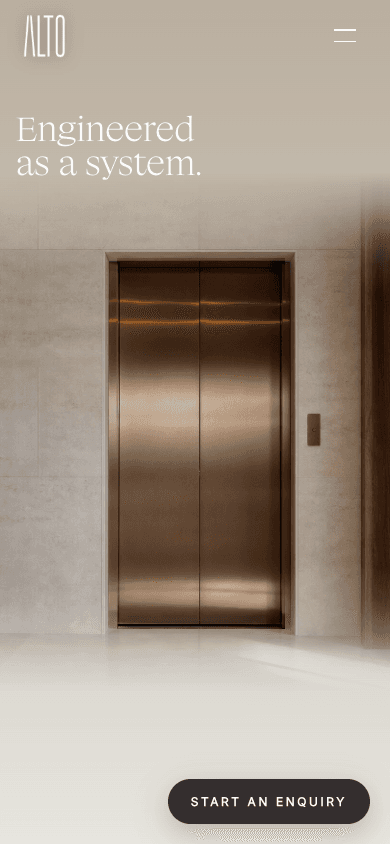
Alto Elevators needed to present two distinct product ranges: elevators and turntables. Visitors needed a clear route from the first image to product details and an enquiry.
Kavera built the website structure, responsive interface and separate elevator and turntable journeys. Cinematic imagery and restrained motion support the product story. On a phone, compact navigation and direct enquiry links keep those journeys within reach.
A compact menu keeps the other pages within reach and leaves room for the product.
02
Theproducttakescentrestage
The lift and headline introduce what Alto offers as soon as the page opens.
03
Aclearnextstep
A visible enquiry button gives visitors a direct way to start a conversation.
What changes
WhatKaverafixesinaredesign
The visual system matters but it has to support the business outcome. Each part of the redesign has a job.
Maketheofferobvious
Visitors should understand what you do, who you help and why they should trust you before the design asks them to admire anything.
Positioning
Service hierarchy
Direct headings
Designfortherealscreen
Most people judge the business from a phone first. The redesign has to make reading, tapping and enquiring feel natural on small screens.
Mobile layouts
Touch targets
Readable sections
Provecredibility
A redesign should make examples easier to find and easier to believe, whether that is work examples, process, experience or clear service detail.
Case study framing
Trust sections
Process clarity
Makecontactfeelobvious
Forms, email links, quote prompts and booking paths need to be part of the design system, not bolted on at the end.
Button rhythm
Enquiry paths
Analytics basics
Redesign vs rebuild
Keepwhatworks.Rebuildwhatisholdingyouback.
Keep
Useful copy, assets, pages, case studies, integrations and brand elements can stay if they still help the business.
Cut
Confusing sections, weak buttons and links, duplicate pages, outdated claims and mobile friction should not survive the redesign.
Rebuild
The sitemap, priority sections, visual system and enquiry path are rebuilt around the current commercial goal.
Process
TheKaveraredesignprocess
01
Reviewwhatexists
We look at the current pages, message, mobile state, content, analytics access if available and the business goal behind the redesign.
02
Decidewhattokeep
Useful assets, copy, pages or systems can stay. Weak structure, confusing sections and dead weight get replaced.
03
Reshapethesitemap
The new structure is planned around services, examples, commercial priorities and the path from first impression to contact.
04
Designthenewexperience
Desktop and mobile layouts are designed around decision-making, not decoration. The site should feel premium and easy to use.
05
Build,testandpreparelaunch
We build the agreed direction, test key paths, prepare metadata, check mobile and plan redirects where they are needed.
Project scope
Websiteredesignpricingdependsonwhatneedsfixing
If your redesign needs a custom Business Website rebuild, our published range is $4,000 to $9,000 + GST.
We review your existing pages, content and features before recommending the scope. Smaller improvements and larger CMS or ecommerce rebuilds are quoted around the work required.
Redesign cost depends on how much strategy, copy, design, development, migration, ecommerce and integration work is needed. Kavera will recommend the smallest serious scope that fixes the actual problem. All prices are in AUD.
A typical website redesign takes 3–6 weeks from an agreed scope and ready content. The number of pages, content changes, CMS migration, ecommerce features and integrations shape the schedule. Feedback and approval times also affect the launch date.
To get started, send your current website and the goals for the redesign. We will ask for your logo, images, service details and any copy you want to keep or update. Access to your existing website, domain, Search Console and analytics helps us plan the migration and establish a baseline.
We agree who supplies each piece of content and who reviews the work before setting the delivery dates. Larger rebuilds or projects waiting on content may need more time.
Related services
Plantheredesignaroundthewiderwebsitesystem
Customwebsitedesign
See the broader Kavera website service behind new builds and redesigns.
A website redesign improves an existing site so it better supports the business. That can include strategy, copy, page structure, design, mobile UX, speed, SEO foundations, forms and the way people move from landing on the page to making contact.
How is a redesign different from a quick revamp or refresh?
A quick revamp or refresh updates a few visible details, such as the copy, images or layout of one page. A redesign reviews how the whole site supports the business, then improves its message, structure, mobile experience and enquiry path while keeping useful content and systems. A full rebuild replaces the underlying site when its platform or foundations cannot support the changes needed.
How do I know if my website needs a redesign?
Your website may need a redesign if it gets visitors but few enquiries, feels weak on mobile, no longer matches your business, loads slowly, is hard to update or makes it difficult for people to understand what to do next.
Is a redesign cheaper than a new website?
Sometimes but not always. If the current site has useful content, structure or assets, a redesign can keep what works. If the platform, page structure or UX is holding the business back, a rebuild may be the better investment.
Can Kavera redesign ecommerce websites?
Yes. Ecommerce redesigns can include product structure, product page clarity, cart confidence and checkout path review. The right scope depends on the platform, catalogue, content and checkout issues that need fixing.
Will a redesign help SEO?
A redesign can improve the SEO foundation when it fixes crawlable structure, headings, internal links, metadata, schema, mobile usability and performance basics. Rankings still depend on competition, content quality, authority and how Google measures the site over time.
How do you protect existing rankings during a website redesign?
We inventory your existing URLs and review the pages that bring in search visitors. Useful content and URLs stay wherever possible. If a URL needs to change, we prepare a redirect map to its most relevant replacement. Before launch we check redirects, internal links, metadata and forms. After launch we use Search Console and analytics to measure indexing, search traffic and enquiries against the earlier baseline. This reduces avoidable disruption but cannot guarantee unchanged rankings.
Readyforabetterwebsite?
Show us your current site. Add the website link and your redesign goals in the enquiry form’s message field. We’ll work out what to keep and what to improve.