

AI search
AI SEO: how to get your business recommended by ChatGPT and Google AI Overviews
The quick answer
AI SEO helps customers find your business in AI answers by improving the information those systems can access. Start with accurate business details, accessible service pages and evidence from real work. Allow the relevant search crawlers, keep local listings current and measure mentions separately from citations using the same customer questions over time.
On this page
Key takeaways
- A business mention, a link to your website and a qualified enquiry are separate outcomes and need separate measures.
- Allowing OAI-SearchBot for ChatGPT search does not require allowing GPTBot for model training.
- Google AI Overviews use Googlebot access; Google-Extended controls separate Gemini training and grounding uses.
- SHORE appears in Google AI Overviews and ChatGPT recommendations for custom home builders in Sydney's Eastern Suburbs.
- A useful service or suburb page needs specific customer information and real evidence beyond a changed place name.
AI SEO is the work of making your business easier to find and represent accurately in AI search answers. You will also see it called AI search optimisation or LLM SEO. Our guide to generative engine optimisation explains the terminology. Here, the job is practical: give search systems useful information about your services and check what they do with it.
For a local business, start with the pages and listings customers already use. We built SHORE's website and run its SEO. Google AI Overviews and ChatGPT have recommended the Sydney design and build firm for custom home building and design and build services in the Eastern Suburbs.
Use the steps below to identify work you can handle yourself and the checks to give your website developer. Our SEO services cover the technical foundations, content and search opportunities behind that work.
What does an AI SEO result actually look like?
An AI SEO result is a business recommendation or a citation to a page on your website. SHORE appears in both the written recommendations and supporting sources shown below.
After we rebuilt SHORE's service and suburb pages, Google's AI Overview for "duplex bondi beach" named SHORE's SOL duplex and cited SHORE's project page. Non-brand Google appearances rose from 1,204 to 9,492, about 7.9x, between the four-week windows of 22 June to 19 July 2026 and 4 September to 1 October 2026. Those figures cover Australian searches across the website and Maps listing together.
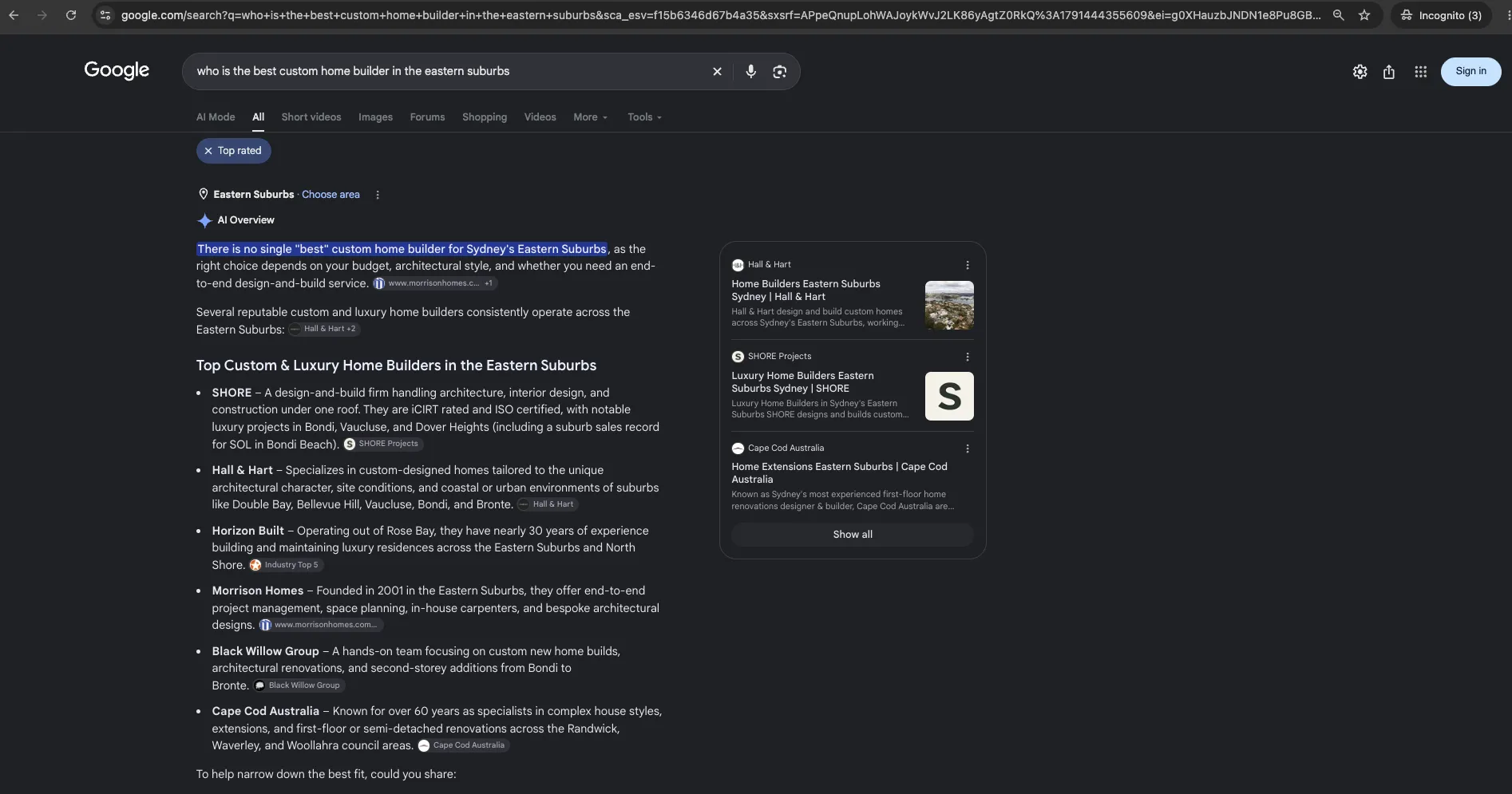
The three screenshots below show SHORE recommended for custom home building and design and build services.
| Search or question shown | Platform | What the capture shows | What to check |
|---|---|---|---|
| who is the best custom home builder in the eastern suburbs | Google AI Overview | SHORE appears in the answer and a SHORE Projects source card is visible | The named firm and the cited page should describe the same business |
| who is the best custom home builder in eastern suburbs | ChatGPT | SHORE Projects appears in the written shortlist | The map cards above the answer show other builders; read the written recommendation separately |
| best design and build eastern suburbs | Google AI Overview | SHORE Projects appears under the design and build specialists with a source card | The recommendation connects SHORE with its service and operating area |
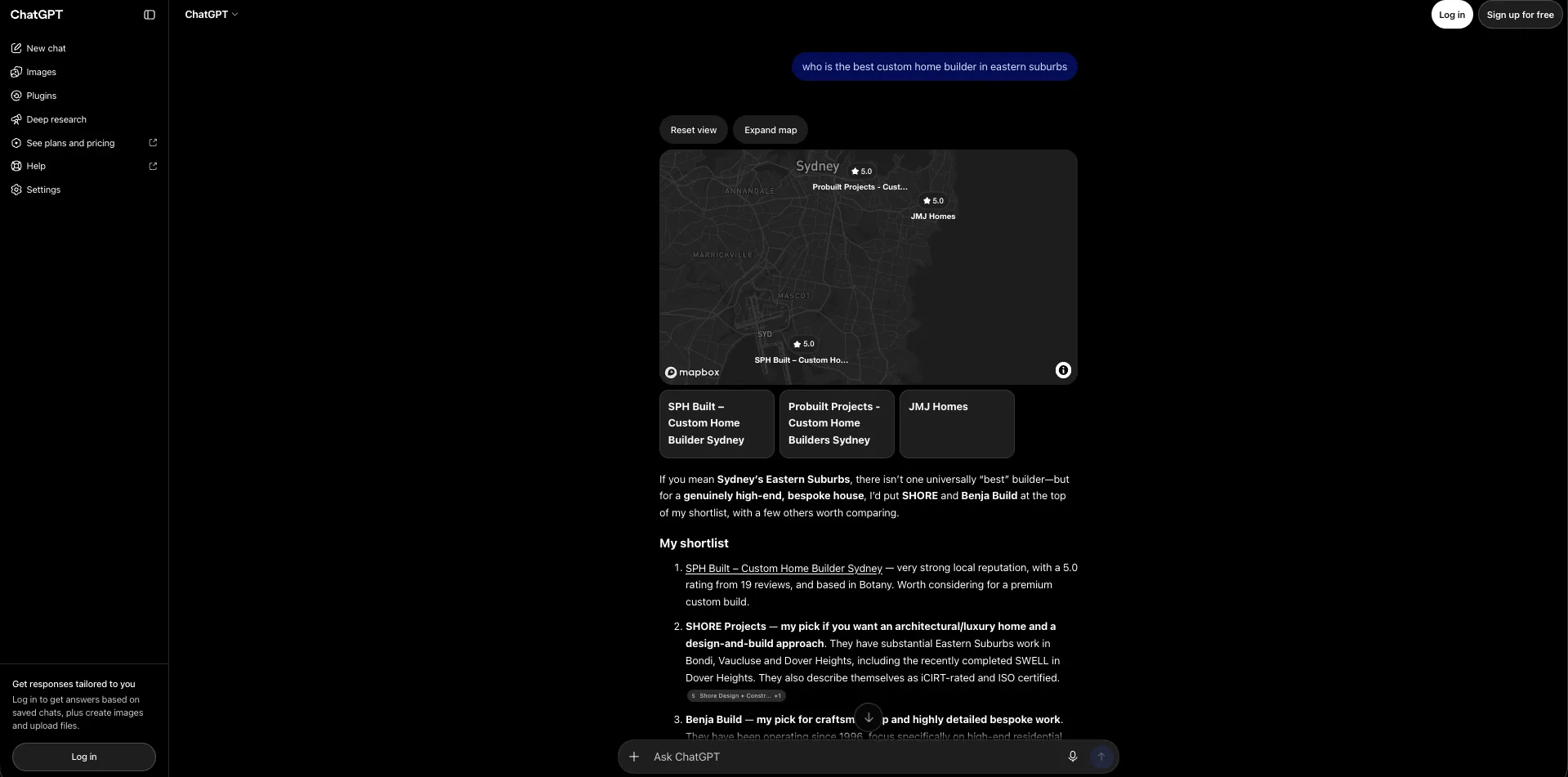
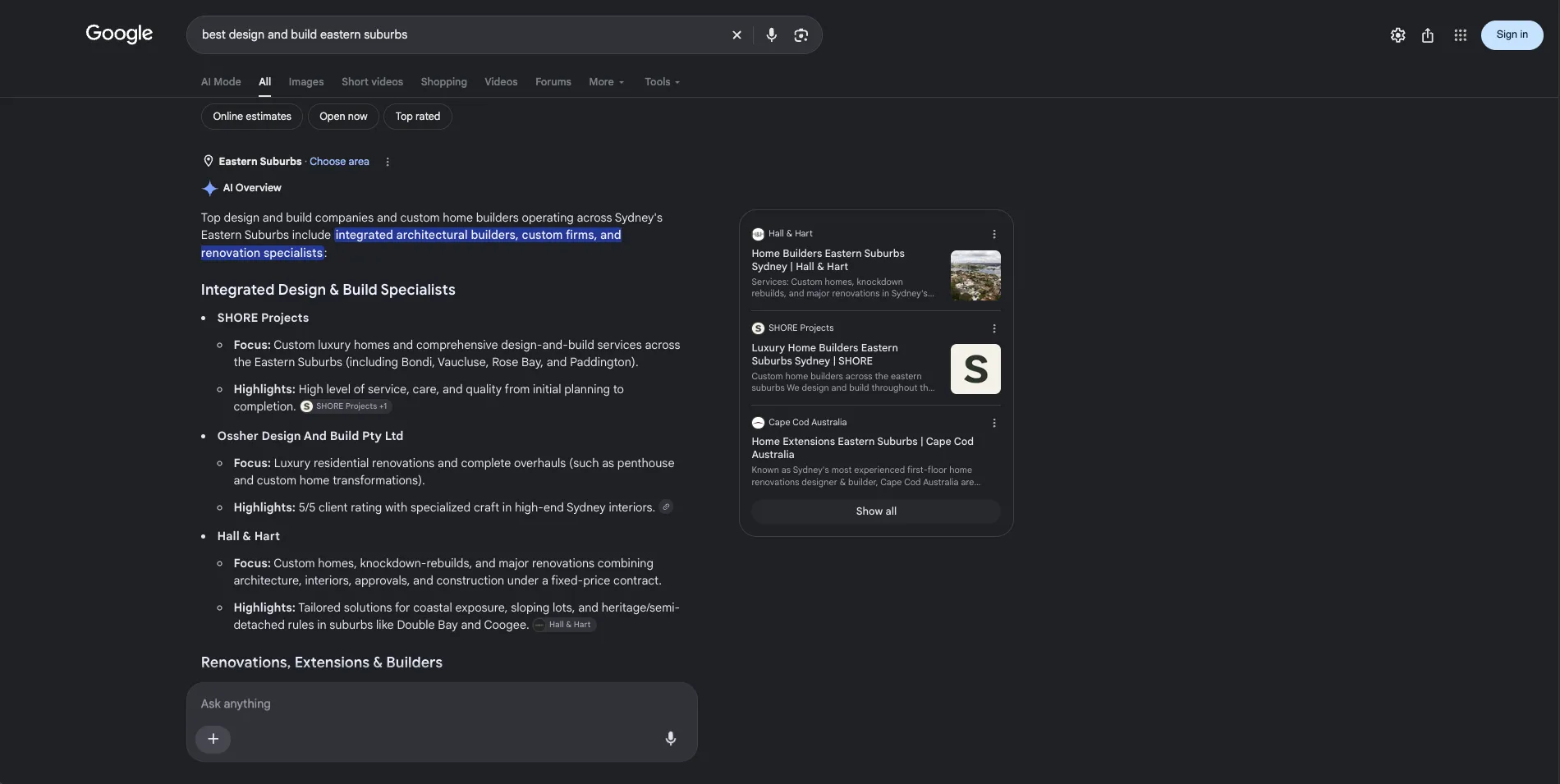
Source: SHORE progress report, 5 October 2026 and Kavera's SHORE screenshots. Impressions are appearances, not visits. AI answers vary by person, place and time.
Before and after in ChatGPT: two months apart
We asked ChatGPT the same question twice in a logged-out Incognito window: "who is the best custom home builder in the eastern suburbs". About two months apart, SHORE went from missing in the answer to first on the shortlist.
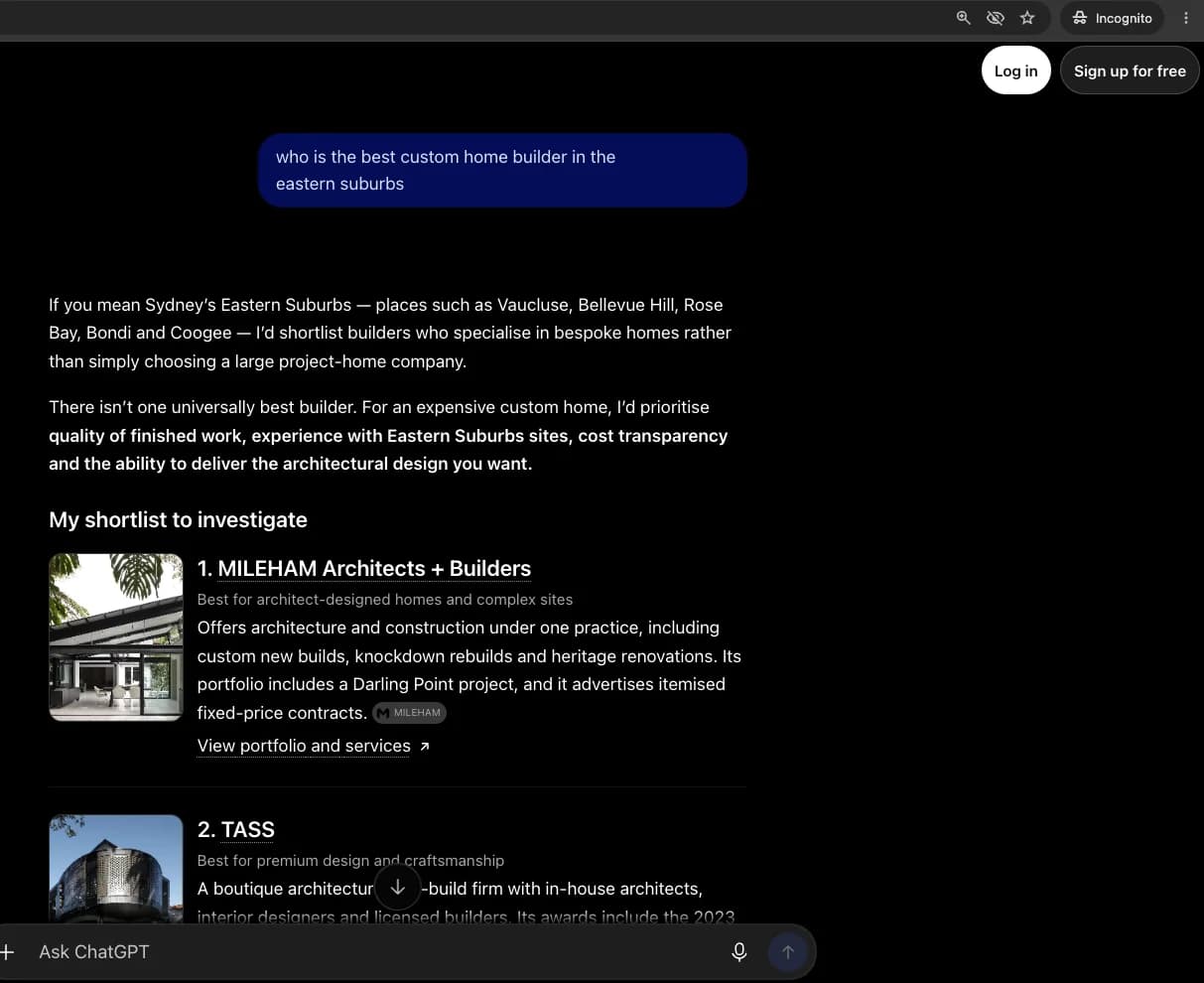
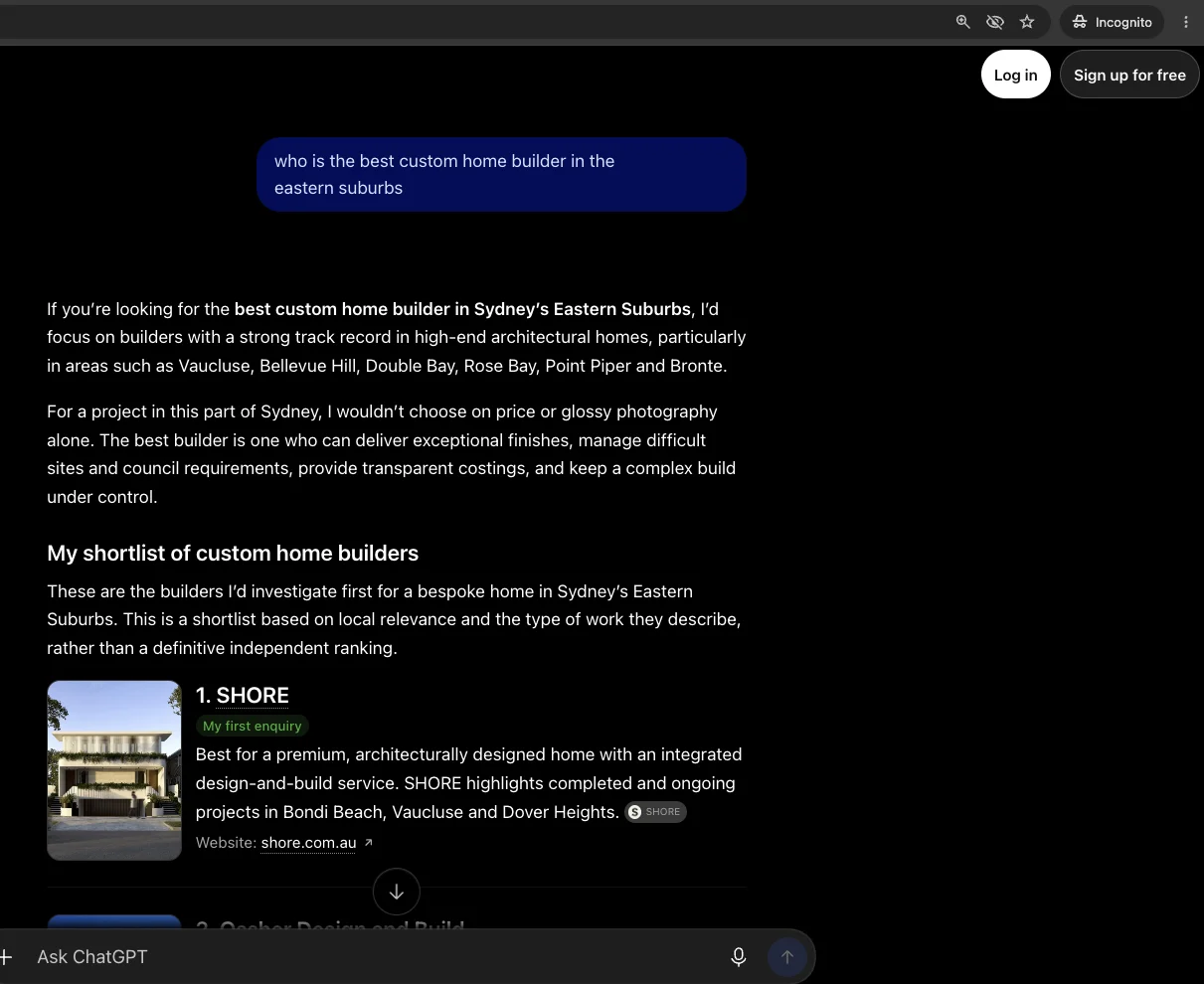
Our ChatGPT SEO case study explains what we changed in those two months and how to run the same test for your business.
Kavera note: We built 17 new service and suburb pages for SHORE, each with its own projects, local detail and enquiry path. See the website in our SHORE website case study.
1. Which customer questions should you target first?
Start with questions a prospective customer asks while choosing a service you actually provide. Write down the service, location and buying concern before opening an AI tool.
Start with ten questions you will check consistently. Take them from quote requests, phone conversations and the services that matter to your business.
For a building firm, include questions about finding a local custom builder, comparing a design and build service with separate appointments and seeing completed work near the customer's suburb. Keep questions about the business by name in a separate list. Those test whether the assistant understands you after someone already knows you exist.
Create a simple planning table before producing content:
| Customer need | Illustrative question | Best place to answer it | Evidence to gather |
|---|---|---|---|
| Find a suitable provider | Which custom home builders work in my suburb? | Service page linked to relevant local work | Completed projects and genuine service coverage |
| Compare approaches | Should I use a design and build firm? | Service page or decision guide | Your actual scope, process and exclusions |
| Understand fit | Can this builder work on a difficult site? | Detailed project page | Photos and an explanation of the site constraints |
| Prepare an enquiry | What information should I bring to a first meeting? | Service or contact page | The information your team actually needs |
Adapt these planning examples to your customers' wording and genuine services. Keep the final wording unchanged during measurement for a consistent comparison.
2. How do you make your business identity consistent?
Use one accurate description of your business across the website and the public profiles you control. Make it clear which company offers the service, where it operates and how a customer can contact it.
Create a reference sheet containing your public business name, canonical website address, phone number and genuine operating areas. Include the service categories you use, opening hours where relevant and links to your official profiles. Check these against the website footer, contact page and major listings.
Correct substantive conflicts first. An old phone number or a directory describing a service you stopped offering matters more than minor punctuation differences. If another business shares your name, use your location and service description to distinguish yours. Check the destination of each source link before counting an AI mention as yours.
For a service business without a customer-facing office, describe the areas you serve accurately. Do not invent a local branch to make a suburb page look more established. Google asks businesses to provide complete and accurate information to help it match relevant local searches.6
Keep a short change log: which listing was wrong, what you corrected and when. That gives your next review something concrete to inspect if an assistant continues using the old details.
3. Which crawlers should your website allow?
Allow the search crawlers needed for the platforms where you want public content discovered. Treat permissions for model training as a separate business decision.
Ask your developer to check both the site's robots.txt file and its hosting or firewall rules. A permissive file does not help a crawler that receives a challenge page instead of your content.
| Crawler or control | Purpose | Practical decision |
|---|---|---|
| Googlebot | Google Search crawling, including access for AI Overviews and AI Mode | Allow the public pages you want eligible for Search.1 |
| OAI-SearchBot | Discovery for ChatGPT search | Allow access to the public content you want surfaced in search.3 |
| GPTBot | Crawling content that may be used for OpenAI model training | Choose independently of OAI-SearchBot; search visibility does not require this permission.3 |
| Google-Extended | A robots.txt control for Gemini training and grounding in specified Google products | Decide whether those uses fit your policy; this is not the AI Overview access switch.4 |
| PerplexityBot | Finding and linking pages in Perplexity search, not foundation-model training | Allow relevant public pages and legitimate requests from its published IP ranges.5 |
For a public marketing site, ask your developer to express the search permissions with user-agent groups such as these. This example allows search access and declines Google-Extended uses; choose that permission to match your business policy.
User-agent: Googlebot
Allow: /

User-agent: OAI-SearchBot
Allow: /

User-agent: PerplexityBot
Allow: /

User-agent: Google-Extended
Disallow: /
Merge these example groups into the existing robots.txt configuration. Preserve the site's exclusions and review how specific groups interact with its other rules before making changes.
For GPTBot or Google-Extended, an Allow: / group permits the respective use while Disallow: / declines it. Make that choice deliberately. Google-Extended has no separate HTTP crawler identity.4
Google-Extended does not affect Google Search inclusion or ranking, including AI Overviews; Googlebot controls crawling for Search.41
OpenAI's ChatGPT-User and Perplexity's Perplexity-User are separate fetchers for user-initiated actions. Their treatment of robots.txt differs from automatic crawling. Check each provider's documentation rather than using those names as substitutes for its search bot.35
Have your developer verify actual crawler requests against provider IP information and inspect the server logs for successful page access. Perplexity's official firewall guidance combines user-agent and IP checks.5
4. How do service and suburb pages become useful sources?
Give each important service a page that explains the offer and supports it with relevant work. Add a suburb page only when you have useful information specific to that location.
Start by improving existing pages. Identify the service in the title and main heading, explain the scope near the top and show the projects or practical details that help someone decide whether to enquire. Link from the service page to relevant projects and back again using descriptive link text.
For a suburb page, gather local work, access considerations or other genuine details your team can explain accurately. Keep a clear route to the broader service page. Google identifies substantially similar location pages created to funnel visitors elsewhere as a doorway-abuse risk.7
Ask your developer to check that the important text is available on the page, internal links can be followed and the preferred URL is consistent. Then inspect the page in Search Console. To appear as a supporting link in Google's AI features, it must be indexed and eligible for a search snippet.1
Kavera note: We corrected SHORE's sitemap and preferred page addresses, redirected 51 old website addresses and cleaned up the structured data. We also added eight completed projects to the custom homes page, giving customers relevant work to explore alongside the service.
Treat old URLs carefully when improving a site. Keep a useful page at its established address where possible. If it must move, make the replacement clear and have the developer check the redirect rather than leaving customers at an error page.
5. How should you write answers that customers can use?
Open each section with the answer to its question, then explain the conditions and show the evidence. Clear sections help customers find the information they need to choose a provider.
Imagine a customer asking whether your company handles both design and construction. A useful answer names the stages your team covers, explains which work belongs to external specialists and identifies what the customer needs to supply. Follow it with an actual project that demonstrates that scope.
Replace unsupported adjectives with information someone can assess. Explain the starting problem, the work completed and the choices made along the way in each project description. Photos need captions that identify the project and your role. Publish costs only when the scope and qualifiers are clear and approved.
Google's current AI search guidance emphasises original experience and useful content. It also says its systems can identify relevant passages without special content chunking. Write clear sections for readers and put real effort into the information inside them.2
A page review should answer four questions:
- Can a customer understand the service without reading another page first?
- Does each important claim have a project, source or explanation behind it?
- Are limitations such as service coverage and exclusions easy to find?
- Is the next action appropriate to what the customer has just learnt?
Give a named person responsibility for reviewing the page when services change. Update the facts as well as the displayed date.
6. What should you fix on Google Business Profile?
Complete your Google Business Profile with accurate categories, services and operating details, then keep it aligned with the website. Google describes local ranking in terms of relevance, distance and prominence.6
Compare the profile with the reference sheet from step two. Check the website link and hours, including exceptions. Add services that customers can actually book and use recent photos that represent the business. Follow the profile link through to the page a prospective customer will land on.
For your business, ask customers for an honest account of their experience through your usual follow-up process. Leave the wording and rating to them. Google prohibits incentives for reviews and selectively soliciting positive reviews.8
Kavera note: We completed SHORE's Business Profile services and areas and published five posts. We also updated its ArchiPro profile and rewrote the SOL project listing, giving customers clear service information and project detail across those platforms.
Review the sources that appear in your actual AI samples. If a relevant industry directory contains outdated details about your business, correct them. Where you have a legitimate project partnership or association membership, make sure the public description is accurate. We prioritise sources a customer could use to verify the business over accumulating listings for their own sake.
7. Does schema or an llms.txt file make AI recommend you?
Use structured data to describe the information on your pages accurately. Google says there is no special AI schema requirement and its Search systems do not use llms.txt.2
Ask your developer to check the business name, website URL and contact details in the existing markup against the visible page. Use the most appropriate supported business type and include only facts you can substantiate. Google's local-business documentation explains the fields it supports and how to validate them.9
This copyable JSON-LD example uses the fictional Example Builders business. Replace every sample value, including the telephone placeholder and profile URL, with your own details. All fields must match visible page content; sameAs should link to an official profile identifying the same business.
{
  "@context": "https://schema.org",
  "@type": "LocalBusiness",
  "name": "Example Builders",
  "url": "https://example.com.au/",
  "telephone": "REPLACE_WITH_PUBLIC_PHONE_NUMBER",
  "areaServed": {
    "@type": "Place",
    "name": "Example service area"
  },
  "sameAs": [
    "https://example.com.au/profiles/example-builders"
  ]
}
This is a teaching example, not a complete rich-result eligibility template. Have your developer adapt it to the business and check Google's required fields before adding it to the site's existing structured data.9
For articles, make authorship and dates visible. For project pages, describe the actual project and the business's role. Avoid adding unearned awards, ratings or locations because a plugin provides a field for them.
Keep useful FAQs for readers. Google has retired FAQ rich results in Search, so use FAQ content to answer customer questions and treat FAQPage markup as a description of that visible content.10
Have the developer validate the rendered structured data and inspect the page itself. Fix markup errors and check that every field matches the information customers see.
8. How do you measure ChatGPT SEO and Google AI visibility?
Repeat the same customer questions under recorded conditions and save the complete responses. Count correct business mentions separately from verified links to your website, then compare each platform with its own earlier results.
Start a fresh conversation for each question so a previous discussion of your business does not supply the answer. Record the product and visible model label, search setting, location shown, account state and date. If the interface does not show a setting, record it as unknown.
Use a worksheet with these fields:
| Field | What to record |
|---|---|
| Question | Exact wording and a fixed question ID |
| Conditions | Platform, date, location shown, account state and visible search or model settings |
| Response status | Complete answer, failed, blocked or AI Overview not shown |
| Business mention | Whether the answer names the correct business |
| Website citation | Whether a source link resolves to your actual domain |
| Accuracy | Wrong location, service, phone number or other claim needing correction |
| Evidence | Saved response, screenshot and source URLs |
Repeat the starting set on a second date to establish your baseline, then review it monthly under the same conditions.
Keep the denominator visible
Calculate mention rate as complete answers naming your business divided by all complete answers for that platform. Calculate citation rate using complete answers with a verified own-domain link. Show the counts beside each percentage.
For example, if two of eight complete answers name your business, the sample mention rate is 25%. If one links to your domain, the citation rate is 12.5%. Record any blocked attempts in a separate failure count.
For Google AI Overviews, also record how many queries displayed an Overview. Log a search page without an Overview separately from answers that name other businesses. Keep Google AI Mode in its own column or worksheet.
Add platform reporting and business outcomes
Google introduced dedicated Generative AI performance reports in Search Console in June 2026 and says the insights rolled out to all websites worldwide by 31 August. They show impressions and breakdowns including pages, countries and dates. These impressions also remain included in overall performance, so do not add the two totals together.11
Use that report alongside your saved answers: Search Console tracks Google's visibility, while your question set shows the recommendations and sources returned by each platform.
OpenAI says ChatGPT referral URLs include utm_source=chatgpt.com. Inspect identifiable visits in your analytics and check the landing pages and subsequent enquiries.12 Keep a customer saying they found you through AI as a separately labelled self-reported source.
Define a qualified enquiry with your team, such as a prospective customer asking about a service you offer in an area you serve. Track those enquiries alongside citations and website visits to decide where to spend more.
What should you do during the first month?
Use the first month to establish a baseline and repair the clearest information gaps. Follow this work order to focus each week on a useful improvement.
| When | Work to complete | Evidence to keep |
|---|---|---|
| Week 1 | Choose the question set, capture the starting answers and check business details | Exact prompts, responses and a list of conflicting details |
| Week 2 | Check crawler access and improve the most important service page | Developer checks and a dated record of page changes |
| Week 3 | Add relevant project evidence and correct priority profile or directory information | Published page links and listing read-backs |
| Week 4 | Repeat the same questions and review identifiable visits and enquiries | Comparable answers with complete-response counts and a separate enquiry log |
If you need help, ask a provider to name the pages it will improve, the technical checks it will complete and the evidence its reporting will show. Our SEO services begin with those foundations and an agreed scope of work, so you know what we are improving and how we will measure progress.
Common questions
How do I get my business to show up in ChatGPT?
Start by checking whether ChatGPT can access your public pages through OAI-SearchBot. Make your services and operating areas clear, support them with real projects and correct conflicting business listings. Then test a fixed set of customer questions in separate conversations. Record business mentions and links independently so you can see what changed.
How do I know if ChatGPT recommends my business?
Ask the questions your customers use when choosing a provider and save each complete answer. Check that the business named is yours, then open the source links to see which pages support the recommendation. Repeat the same questions in fresh conversations each month and compare the mentions, citations and accuracy.
How long until I see results?
Use the first month to establish your starting position, correct business details and improve priority pages. Repeat your customer questions monthly to see where recommendations and citations change. Review those answers alongside Google's reporting and the enquiries reaching your business, then use the findings to choose the next pages to improve.
How do you measure AI search visibility?
Use a fixed question set and keep each platform separate. Save the complete answers with dates and settings, then count correct mentions and verified links to your own domain. Record failures and absent AI Overviews separately. Add Search Console's Generative AI impressions, identifiable referral visits and qualified enquiries as distinct measures rather than one combined score.
Do I need a new website?
Start by improving the pages you already have. Check crawler access, business details, service explanations and project evidence, then ask your developer which fixes the current website supports. Rebuild when the existing system prevents the useful pages or essential improvements your business needs. Let those requirements shape the scope of the new website.
Can I use ChatGPT to do my SEO?
Use ChatGPT to organise customer questions, draft an outline and identify gaps in a page you supply. Add your team's experience, project details and approved service information to the draft, then check the facts and sources before publishing. Track your search visibility separately with saved customer questions and complete responses.
Sources
- AI features and your websiteGoogle Search Central. Accessed .
- Optimizing your website for generative AI features on Google SearchGoogle Search Central. Accessed .
- Overview of OpenAI CrawlersOpenAI. Accessed .
- Google's common crawlers: Google-ExtendedGoogle. Accessed .
- Perplexity CrawlersPerplexity. Accessed .
- Tips to improve your local ranking on GoogleGoogle Business Profile Help. Accessed .
- Spam policies for Google web searchGoogle Search Central. Accessed .
- Prohibited and restricted content: fake engagementGoogle Maps. Accessed .
- Local business structured dataGoogle Search Central. Accessed .
- Search documentation updates: FAQ rich result retirementGoogle Search Central. Accessed .
- Introducing Search Generative AI performance reports in Search ConsoleGoogle Search Central. Accessed .
- Publishers and Developers FAQOpenAI. Accessed .
Let’s talk.
Tell us what your business needs and we will point you to the right option.
SEO services