

AI search
How to get more Google reviews and what they mean for AI search
The quick answer
To get more Google reviews, ask real customers after a job is finished and send them a direct review link or QR code. Invite honest feedback with no rewards, no pressure and no picking only the happy ones, because Google bans all three. Reviews can help your local ranking and may inform some AI answers. They guarantee neither.

On this page
Key takeaways
- Ask every real customer at the same point in your process, using the Google review link or QR code from your Business Profile.
- Google bans three things: offering rewards for reviews, discouraging negative reviews and asking only the customers you expect to be positive.
- Google says more reviews and positive ratings can help local ranking. It gives no review count that guarantees a position.
- Google lets developers build apps on its Gemini AI that use Maps data and reviews in answers. That doesn’t show how every other assistant uses reviews.
Google reviews build up when asking becomes a habit. You send every customer the same short message at the same point in the job, with a link that takes them straight to your review page. Strangers read those reviews when they’re deciding whether to contact you, so a steady flow matters.
Say you run a plumbing business and you’ve just signed off a blocked drain in Marrickville. Before you pack up the ute, you text the customer a thank-you with your review link. That night they tap it on the couch and write a couple of lines about how it went. You do the same on the next job and the one after, so the reviews keep arriving without you chasing anyone.
Below you’ll find a five-step routine, a message you can copy and the rules that keep your reviews safe. We also cover what reviews do and don’t do in AI answers. Our local SEO service includes review request tools and reply drafts as part of managing your Google Business Profile. That profile is the listing Google shows for your business in Search and Maps.
Why do Google reviews matter for your business?
Reviews help in two ways. A stranger uses them to decide whether to contact you. Google also says that more reviews and positive ratings can help your business show higher in local results.6
Google notes that honest, balanced feedback helps potential customers and that a mix of positive and negative reviews often seems more trustworthy.1 A few recent, specific reviews tell a stranger more than a perfect score with no detail.
That’s why the routine matters more than any single campaign. It keeps new reviews arriving while the job is still fresh in the customer’s mind.
How to get more Google reviews: what does Google allow?
Ask real customers after the work is done, send a direct link and treat every customer the same. Google bans three things: offering rewards, discouraging negative reviews and asking only for positive ones.3
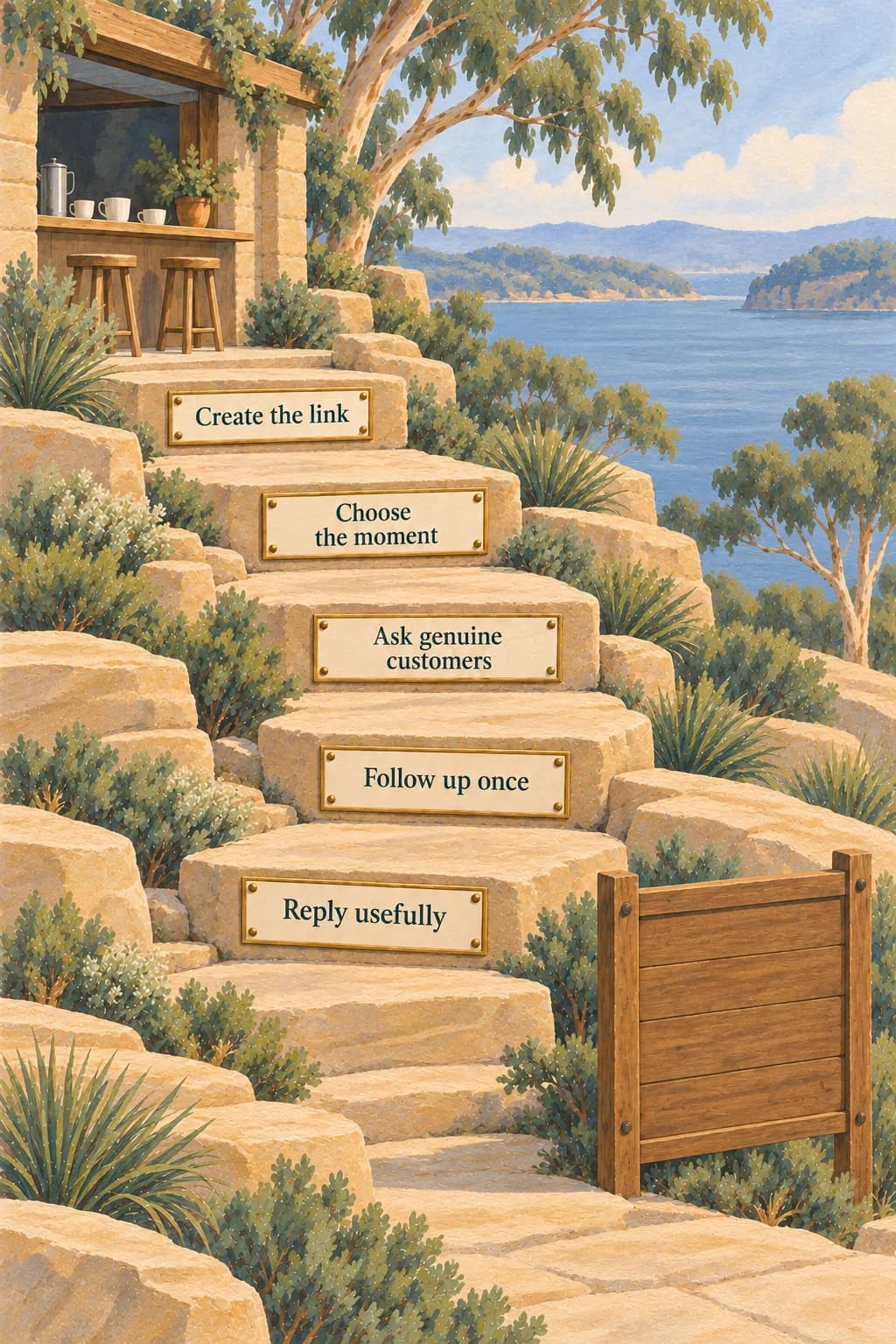
Here is the routine in five steps:
- Create your review link and QR code from your Business Profile.
- Decide the moment you ask, such as the day the job is completed.
- Send the same short request to every customer through the same channel.
- Send one polite follow-up to anyone who hasn’t replied.
- Reply to reviews where you can add something useful.
The routine works because you never have to decide who to ask. If you ask everyone, you can’t slip into picking only the happy ones by accident.
Picture five stepping stones laid out from a café counter to a noticeboard. Each stone is one step of the routine, so every customer walks the same path in the same order.
Where do you get your Google review link or QR code?
You get both from your Business Profile on a computer. Open your profile, select Read reviews, then choose Get more reviews. Copy the link or save the QR code image, which is the square pattern a phone camera can scan.2
Google notes that you can currently only create review QR codes in a computer browser and not on a mobile device.2 Customers must be signed in to a Google Account to leave a review. They don’t need a Gmail address, because they can set up an account with a different email address.1
Google suggests placing the link or code on receipts, in thank-you emails, at the end of a chat and as a printed code in your store.2 Test the link on your own phone before you use it.
When should you ask customers for a review?
Ask when the work is finished and the customer has had a chance to see the result. Use the same moment for every customer, whether they were delighted or mildly annoyed. Here are some natural moments for different kinds of business.
Scroll across to read every column
| Business type | A natural moment | Channel |
|---|---|---|
| Trades and home services | The day the job is signed off | SMS or the invoice email |
| Clinics and studios | After the appointment is complete | Email or a printed code at reception |
| Retail and hospitality | After purchase or a visit | Receipt, email or a printed code |
| Builders and renovators | At handover |
Google says businesses shouldn’t require or pressure customers to leave ratings or write reviews while they are on the premises.3 A printed code that customers can scan if they choose is different from standing over someone while they type.
What should a review request say?
A good request thanks the customer, asks for honest feedback and links straight to the review form. It doesn’t mention stars, keywords or staff names. Here is an example text message you can adapt.
Hi Sam, thanks for choosing us for your bathroom repair this week. If you have a minute, we’d value your honest feedback on how it went: [your review link]. Thanks again.
A short email works the same way if you keep three things out of it: a request for a particular star rating, a request that the customer mention certain words and any link to a discount. Google also says businesses shouldn’t ask for specific content to be included in a review.3
Only message customers who expect to hear from you, so check your records for consent before you send an SMS or email request.
Can you offer rewards or ask only happy customers?
No. Google bans both, along with staff review quotas and requests for specific content.3 This table shows what is allowed and what isn’t.
Scroll across to read every column
| Practice | Allowed? | What Google says |
|---|---|---|
| Asking every genuine customer for honest feedback | Yes | Businesses may ask for or encourage genuine reviews as long as nothing is offered in return3 |
| Sending a link or QR code | Yes | Google suggests asking customers to use a Google link or QR code1 |
| Free or discounted goods, services or payment for a review | No | Banned, including when the aim is to remove or change a negative review3 |
| Asking only customers you expect to be positive | No | Asking only for positive reviews is not allowed3 |
| Requiring staff to collect a set number of reviews | No | Review quotas for staff are not allowed3 |
| Pressuring customers to review on the premises | No | Not permitted3 |
| Posting reviews yourself or from several accounts | No | Reviews from multiple accounts or based on a conflict of interest are not allowed3 |
Some popular guides still recommend discounts or “best customers only” lists. Follow Google’s policy instead, because reviews that breach it can be removed.
How should you reply to reviews and handle negative or missing ones?
Reply in a short, professional tone and keep customer details private. Google advises against repeating the same generic thank-you and against using replies to promote deals.1
Say a customer leaves a poor review because you turned up late. Acknowledge the problem, say what you can and can’t do about it and keep the reply brief. Google also advises replying promptly and avoiding personal attacks.1
Report a review only when it breaks Google’s policies, because a review you simply disagree with isn’t eligible for removal. Google says evaluation typically takes several days. You can submit a one-time appeal for up to 10 reviews that were not removed.5
If a review seems to be missing, Google lists several causes:
- Google checks reviews against its policies, which can take a few days.
- A merged profile can delay reviews.
- Customers on older phones may struggle to post a review.
- Reviews that were removed for breaking policy are not restored.4
How many Google reviews do you need?
There is no number that guarantees a position. Google says more reviews and positive ratings can help your local ranking but it also ranks by relevance and distance.6
A target count is less useful than the maths of your average. Say you have 20 reviews averaging 4.0 stars. You would need 20 new 5-star reviews to lift that to a 4.5 average. This table shows the same sum for three starting points.
Scroll across to read every column
| Current reviews | Current average | New 5-star reviews needed for 4.5 |
|---|---|---|
| 10 | 3.8 | 14 |
| 20 | 4.0 | 20 |
| 50 | 4.2 | 30 |
These are our own calculations from the averaging formula and not a Google method. You can’t choose the stars customers give, so use the table to see the size of the gap and not as a plan. The goal is a steady flow of honest reviews that are recent and specific.
Do Google reviews help your business appear in AI answers?
They can help in some Google products but they haven’t been shown to decide whether ChatGPT or other assistants name your business. An AI answer here means the written reply you get when you ask a tool such as ChatGPT or Google’s AI for a recommendation.
Google offers developers a tool that connects apps built on its Gemini AI to Google Maps information, including user reviews. It calls the feature Grounding with Google Maps in the Gemini API. Grounding means tying an answer to a source. An API is the connection developers use to build on a service.7 All that shows is what apps using that tool can do. It doesn’t show how every consumer assistant, such as ChatGPT, builds its answers.
Reviews also feed your Business Profile, which Google uses for local ranking.6 In our own Sydney trades study, links to review sites and to Google business or map records showed up in only a minority of answers. The exact counts and what they can’t tell you are in the fine print below.
For the wider AI work, our AI SEO guide covers the pages, profiles and checks that give assistants accurate information to use.
How can you tell whether your review process is working?
Count the requests you send and the new reviews that arrive as two separate numbers. Your request log shows whether the routine is running. New reviews may include people you never asked, so their total isn’t a response rate. Keep both numbers apart from AI mentions and enquiries.
Scroll across to read every column
| Measure | How to record it | What it tells you |
|---|---|---|
| Requests sent | A tally by week | Whether the routine is actually happening |
| New reviews | The count in your Business Profile | How many reviews arrived, including reviews that may be unrelated to your requests |
| Reply time | Days between review and reply | Whether you are keeping up |
| Profile actions | Calls, website clicks and direction requests from your profile | Whether the profile is being used |
| Enquiry source | Ask new customers how they found you | Whether Google or AI answers played a part |
Compare the same periods each month, because a single busy week proves little.
Kavera note: Our monthly SEO plans each include review reply drafts and a review request kit with your review link, QR code and a text template.
The fine print on our numbers
The counts come from our Sydney trades study, where a completed answer is one the tool finished.
Kavera note: In our Sydney trades check on 16 and 17 October 2026, review-platform links appeared in 4 of 50 completed ChatGPT answers. Google business or map records appeared in 2 of 49 completed Google AI Mode answers. These are link-category counts. They do not show that reviews caused a business to be named. The full method is in our Sydney trades AI search index.
What should you do next?
Create your review link today, choose the one moment you will ask and send the first message this week. If you want a team to set this up and manage your profile, see our local SEO service.
Our SEO audit is free. Implementation is separate unless retained. Compare the SEO packages for monthly scope and terms. No SEO package guarantees rankings, leads or revenue.
Good questions
Common questions Clear answers
How can I get 1000 reviews on Google?
There’s no shortcut that stays inside Google’s rules. Reviews come from asking every real customer, every time. Buying reviews, offering rewards or posting your own breaks Google’s policy and can get reviews removed. Build the request into your normal process and count how many customers you ask.
How can I increase my Google reviews fast?
Make the request part of how you finish every job. Send a direct link in neutral wording to real customers who have agreed to be contacted. Don’t offer rewards or pick only the happy ones. Keep a record of requests and new reviews so you can see whether the routine works for your business.
How many 5-star reviews do I need to raise my rating?
It depends on your current average and total. With 20 reviews averaging 4.0, you would need 20 new 5-star reviews to reach a 4.5 average. That’s simple arithmetic and not a Google method. You can’t choose which stars customers give, so invite every real customer and let the average settle.
Why can’t I see more Google reviews on my profile?
Google checks reviews against its policies. That can take a few days. Reviews removed for breaking policy aren’t restored. A merged profile can also delay reviews. Customers on older phones may struggle to post. If reviews vanish after a profile is reinstated, contact Google support.
Can I offer a discount or reward for a Google review?
No. Google bans payment, discounts and free goods or services in exchange for any review, including one that changes or removes a negative review. Reviews posted because of an incentive can be removed. You can thank customers who leave a review but don’t make the thanks depend on it.
What should I do about a negative or fake Google review?
Reply politely without sharing private details. Fix the problem if there is one. Report the review only if it breaks Google’s policies, because a review you simply dislike isn’t eligible for removal. Google says it typically takes several days to evaluate. You get a one-time appeal for reviews that weren’t removed.
Do Google reviews help my business show up in AI answers?
Reviews can inform some Google answers. Google gives developers a tool for connecting Gemini apps to Maps information, including user reviews. That doesn’t show how every other assistant picks businesses. Reviews can also help local ranking and inform customers. Keep those benefits separate from any claim that a review count earns you a place in AI answers.
How do I ask for Google reviews without being pushy?
Ask once at a natural point after the work is done. Say you would value honest feedback and make leaving a review optional. Send a direct link so it takes seconds. Skip pressure on the premises, any mention of stars and scripted praise. One polite follow-up is enough for customers who haven’t replied.
Sources
- Tips to get more reviewsGoogle Business Profile Help. Accessed .
- Create a Google link or QR code to request reviewsGoogle Business Profile Help. Accessed .
- Prohibited and restricted content, Maps User Generated Content PolicyGoogle Maps User Generated Content Policy Help. Accessed .
- About missing or delayed reviewsGoogle Business Profile Help. Accessed .
- Report inappropriate reviews on your Business ProfileGoogle Business Profile Help. Accessed .
- Tips to improve your local ranking on GoogleGoogle Business Profile Help. Accessed .
- Grounding with Google Maps is now available in the Gemini APIGoogle. Accessed .